Centroid Calculator
List the rectangles, triangles and circles that make up your shape, with holes as negatives, to find its centroid, area and moments of area.
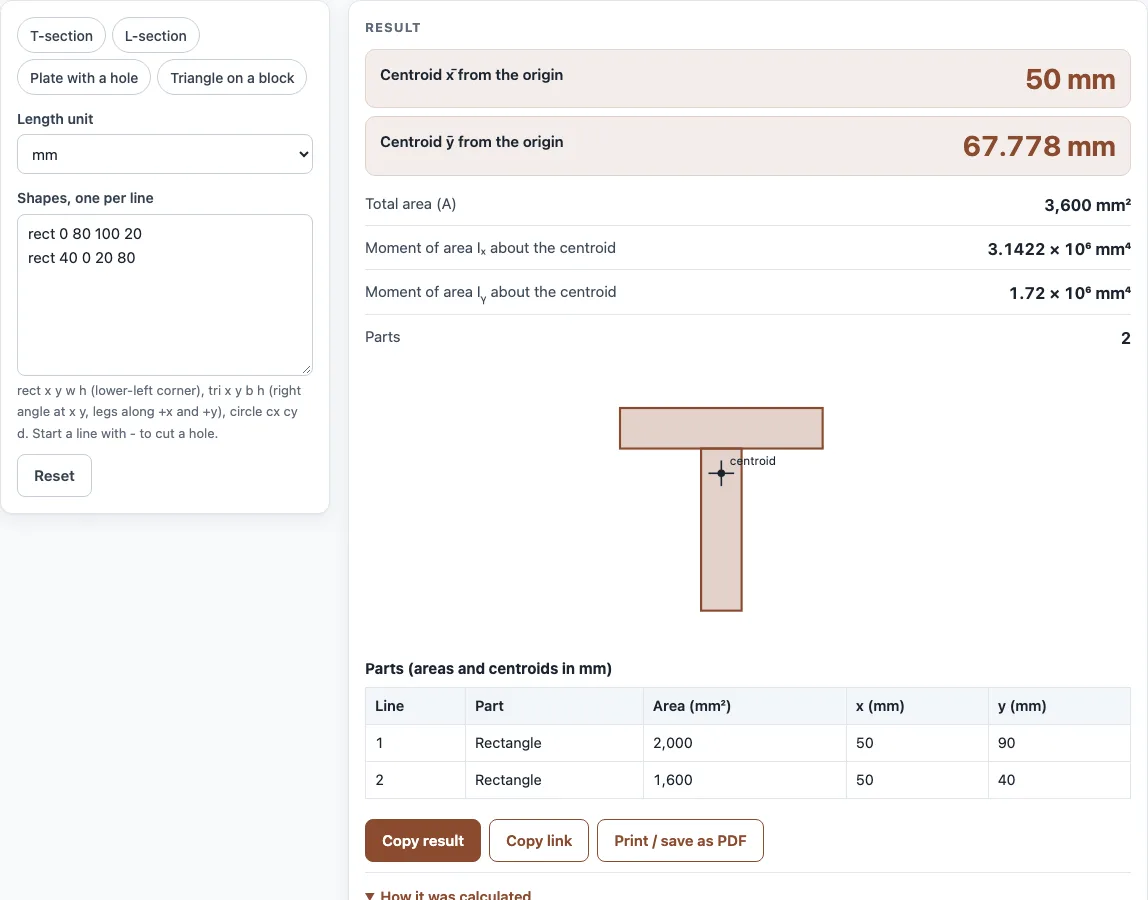
This centroid calculator finds the centre of area of a shape built from simple parts. Type one part per line, rectangles, right triangles and circles, give each its position and size, and mark holes with a minus sign. The tool returns the centroid (x̄, ȳ) measured from your origin, the total area, and the moments of area Iₓ and Iᵧ about the centroidal axes, and it draws the shapes with the centroid marked.
Use it for a T-section, an L-angle, a plate with a hole, a bracket or any profile you can split into rectangles, triangles and circles. It is the usual first step before a bending stress or deflection check, because the neutral axis passes through the centroid. It runs in your browser with no sign-up.
How to use the Centroid Calculator
- Choose the length unit: mm, cm or in. All lines use the same unit.
- Write one part per line in the shapes box. Use “rect x y w h” for a rectangle, where x y is its lower-left corner. Use “tri x y b h” for a right triangle with the right angle at x y, one leg b along +x and one leg h along +y. Use “circle cx cy d” for a circle by its centre and diameter.
- Start a line with a minus sign, or the word hole, to cut that part out. For example “- circle 3 2 2” is a hole of diameter 2.
- Read x̄ and ȳ, the area and the moments of area about the centroid. The table lists every part with its area and centroid, and the drawing shows the shape.
- Lines that begin with # are notes. If a line has a mistake, the tool names the line number.
Pick a preset to load a T-section, an L-section, a plate with a hole or a triangle on a block. Copy link keeps your shapes in the address, so you can share a section or reopen it. Print / save as PDF prints the result, the steps and the table with the date.
How do you find the centroid of a composite shape?
Split the shape into simple parts whose centroids you know. Then take the area-weighted average of their positions: x̄ = Σ(A x) ÷ ΣA and ȳ = Σ(A y) ÷ ΣA, where holes count as negative areas. For the default T-section, a 100 × 20 flange on a 20 × 80 web, the areas are 2000 and 1600, so ȳ = (2000 × 90 + 1600 × 40) ÷ 3600 = 67.8 and x̄ = 50 by symmetry.
Where is the centroid of a triangle?
For a triangle it is one third of the way from each side to the opposite vertex. For the right triangle in this tool the centroid is at one third of each leg from the right angle: (x + b ÷ 3, y + h ÷ 3). A triangle with legs 60 and 40 at the origin has its centroid at (20, 13.33).
What are Ix and Iy about the centroid?
They are the second moments of area about the horizontal and vertical axes through the centroid. For each part the tool adds its own value (b h³ ÷ 12 for a rectangle, b h³ ÷ 36 for a right triangle, π d⁴ ÷ 64 for a circle) plus A d², using the parallel-axis theorem with d the distance from the part’s centroid to the composite centroid. Holes subtract. For the T-section, Iₓ is about 3.14 million mm⁴.
How do I handle a hole?
Add the solid shape first, then a hole line for the cut-out, as in “rect 0 0 6 4” and “- circle 3 2 2”. The hole reduces the area and moves the centroid away from it. A hole at the centre of a symmetric plate leaves the centroid where it was.
What is the difference between centroid and centre of mass?
For a flat shape of uniform thickness and density they are the same point. The centroid depends only on geometry, which is why it is used for sections of beams and plates. For a shape made of different materials the centre of mass is different.
Sources
- Composite-area centroid and the parallel-axis theorem: R. C. Hibbeler, Engineering Mechanics: Statics, “Composite bodies”, and any mechanics of materials text. These are textbook formulas, not tied to one web page.
- Own-centroid moments of area: rectangle b h³ ÷ 12, right triangle b h³ ÷ 36, circle π d⁴ ÷ 64 (standard tables of section properties).
- The tool does not model arcs, slanted rectangles, or thin-walled sections with corner radii; split those into simple parts or use the moment of inertia calculator for standard sections.
Worked examples
| Input | Result |
|---|---|
| 2 shape(s) in mm | centroid (50, 67.78) mm, area 3,600 mm² |
| 2 shape(s) in mm | centroid (28.68, 28.68) mm, area 1,900 mm² |
| 2 shape(s) in in | centroid (3, 2) in, area 20.86 in² |
| 2 shape(s) in mm | centroid (25, 1.667) mm, area 2,400 mm² |
Calculated by the tool above with these values.
Frequently asked questions
Does the order of the lines matter?
No. The tool adds every part and subtracts every hole, in any order. The only rule is that the holes must lie inside the solid so the total area stays positive.
Can I enter a triangle that is not a right triangle?
Not directly. Split it into two right triangles that share a height, or add a right triangle and subtract another. The centroid of any triangle is at the average of its three vertices.
What if the origin is not at a corner of my shape?
Any origin works. The centroid is given relative to the origin you used, and Iₓ and Iᵧ are always about the centroid, so they do not depend on where the origin is.
How accurate are the results?
They are exact for the shapes entered, within the number formatting. They are only as accurate as the dimensions you type and the way you split the section into parts.
How is this different from the moment of inertia calculator?
The moment of inertia calculator takes one standard section, such as an I-beam or tube. This page takes a custom shape made of several parts, with holes, and gives its centroid and Iₓ, Iᵧ about it.
Related tools
- Moment of inertia calculator: use it for standard sections such as rectangles, tubes and I-beams.
- Beam deflection calculator: use it to find how far a beam bends under load.
- Beam load calculator: use it to find the load a beam can carry.
- Column buckling calculator: use it to check a column with the section you found.
- Stress calculator: use it to find bending and axial stress.
- All fabrication calculators: use it to browse every calculator on the site.