Coil Length Calculator
Get the length of strip in a coil from its outside diameter, inside diameter and thickness, or from its weight, width and material.
The coil length calculator works out how much strip is wound on a coil. Enter a coil’s outside diameter, inside diameter and strip thickness to get the strip length in feet and metres. Or enter the coil weight with the strip width, thickness and material density. It also works in reverse: enter a strip length and it returns the coil outside diameter.
The calculator covers carbon steel, stainless steel, aluminium, copper and brass, and you can enter your own density. It also shows the number of wraps, so you can see whether the figures make sense for the coil you are working with.
It runs in your browser. It is free, needs no sign-up, and works on a phone. Results update as you type, so you can change a value and see the effect straight away.
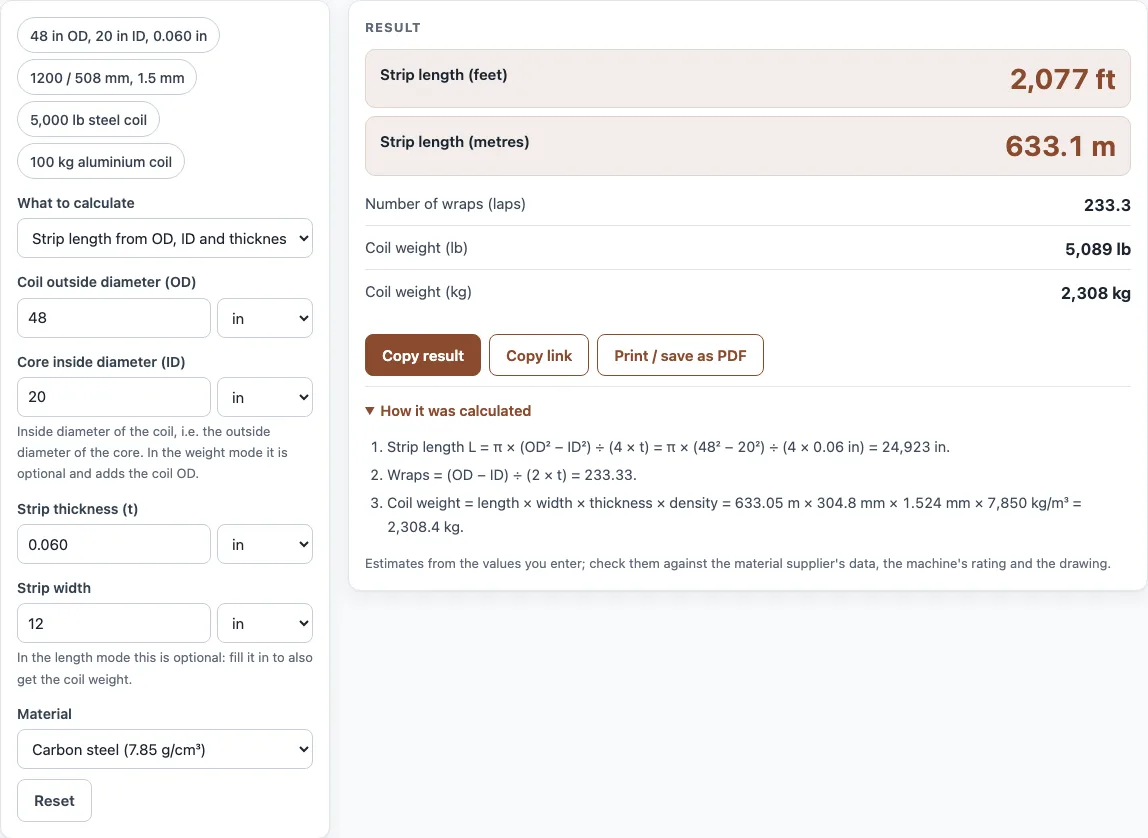
How to use the Coil Length Calculator
- Choose a mode at the top of the tool. Pick strip length from outside diameter, inside diameter and thickness; strip length from coil weight; or coil OD from strip length.
- Enter the values for that mode. For diameters, enter the outside diameter (OD), inside diameter (ID) and strip thickness. For weight, enter the coil weight, strip width, thickness and density. For the reverse mode, enter the strip length, ID and thickness.
- If you are using the weight mode, choose a material from the density list: carbon steel, stainless, aluminium, copper or brass. Choose your own option to type in a density.
- Optionally, enter a strip width when you are using the diameter mode. This adds the coil weight in pounds (lb) and kilograms (kg) to the results.
- Read the results: strip length in feet and metres, number of wraps, coil OD, and coil weight if you entered a width. If a warning appears, check your units first.
- Open “How it was calculated” to see the formula and each step with your own numbers.
Copy result copies the result lines with a link to the calculation. Copy link copies the page address, which stores every input, so opening it later restores the same calculation. Print / save as PDF prints the inputs, results, calculation steps and the date.
How do you calculate the length of a steel coil?
Measure the outside diameter (OD) and inside diameter (ID) of the coil, and the strip thickness (t). The strip length is the area of the coil’s cross-section divided by the thickness. The formula is L = π (OD² − ID²) ÷ (4 t). Use the same unit for all three measurements.
What is the coil length formula?
The tool uses the diameter formula L = π (OD² − ID²) ÷ (4 t), where L is the strip length, OD is the outside diameter, ID is the inside diameter and t is the thickness. Take the worked example of a 48 in OD, 20 in ID coil of 0.060 in strip. Then OD² − ID² = 2,304 − 400 = 1,904, and L = π × 1,904 ÷ (4 × 0.060), which is about 24,923 in. Dividing by 12 gives about 2,077 ft (633 m).
How do I find coil length from weight?
Use L = weight ÷ (width × thickness × density). This works because the weight equals the strip’s volume multiplied by its density, and the volume is length × width × thickness. The units must match the density: for example, weight in grams, width and thickness in centimetres, and density in g/cm³ gives a length in centimetres. The worked example of a 5,000 lb carbon steel coil (7.85 g/cm³), 12 in wide and 0.060 in thick gives 2,041 ft (622 m).
How many wraps are in a coil?
The number of wraps is (OD − ID) ÷ (2 t). The radial build of the coil, which is half the difference between OD and ID, is made up of wraps that are each one thickness thick. For a 48 in OD, 20 in ID coil of 0.060 in strip, the number of wraps is (48 − 20) ÷ (2 × 0.060) = 233.
How do I calculate coil OD from length?
Rearrange the diameter formula to get OD = √(ID² + 4 t L ÷ π). Put the length in the same unit as the ID and thickness. For example, 2,000 ft is 24,000 in. With a 20 in ID and 0.060 in strip, OD = √(400 + 4 × 0.060 × 24,000 ÷ π), which gives a coil OD of 47.26 in.
Sources
Checked October 2026:
- Coil geometry L = π (OD² − ID²) ÷ (4t); densities: steel 7.85 (range 7.75–8.05, Wikipedia, Steel), stainless 304 8.0 (Quickparts 304 data sheet), aluminium 2.70 (Wikipedia, Aluminium), copper 8.94 (Wikipedia, Copper), brass 8.5 (8.4–8.73, Wikipedia, Brass) g/cm³
For estimation; verify critical designs against the applicable standard.
Worked examples
| Input | Result |
|---|---|
| OD 48 in, ID 20 in, t = 0.060 in | 2,077 ft (633.1 m) of strip |
| OD 1200 mm, ID 508 mm, t = 1.5 mm | 2,030 ft (618.9 m) of strip |
| 5000 lb Carbon steel (7.85 g/cm³) coil, width 12 in, t = 0.060 in | 2,041 ft (622 m) of strip |
| 100 kg Aluminium (2.70 g/cm³) coil, width 500 mm, t = 2 mm | 121.5 ft (37.04 m) of strip |
| 2000 ft of strip, ID 20 in, t = 0.060 in | coil OD 47.26 in |
Calculated by the tool above with these values.
Frequently asked questions
Why did I get a warning about the number of wraps?
A warning appears when the number of wraps is implausibly small or large. This is usually caused by a unit mistake, such as entering the inside diameter in millimetres and the thickness in inches. Check that every field uses the same unit system before you rely on the result.
Does the result allow for gaps between wraps?
The formula assumes the coil is tightly wound. If there are gaps between wraps, the real strip length is a little shorter than the result. Treat the figure as a close estimate rather than an exact measurement.
Can I enter a density that is not in the list?
Yes. Choose the option for your own density and type in the value. Use the density of the material you actually have, in g/cm³, so the weight-based result is correct.
Can I use the results on quotes or shop paperwork?
Yes. The results may be used in commercial work, such as quotes, calculations for customers, shop paperwork and reports, without attribution. The tool runs in your browser and does not upload your numbers, and it works on a phone.
Which units can I use?
Diameters and thickness in inches or mm, length in feet or metres, weight in lb or kg.
Related tools
- Press brake tonnage calculator: use it to estimate the force needed to bend sheet or plate on a press brake.
- Punching force calculator: use it to estimate the force needed to punch a hole in sheet material.
- Blank size calculator: use it to work out the flat blank size needed before forming a part.
- Pipe bending calculator: use it to plan bends in pipe and tube.
- All calculators: use it to browse every calculator on the site.