Pipe Bending Calculator
Enter the centreline radius and bend angle to get the arc length, setback and gain, or plan an offset with the distance between bends and shrink.
The pipe bending calculator works out the developed (cut) length and gain for a single bend, the spacing and shrink for an offset, and the cut length for a 90° bend. You enter your bend data, and the results update as you type. It runs in your browser, is free, and needs no sign-up. Nothing is uploaded, and it works on a phone. Each result comes with a drawing and a list of the formula steps, so you can check the numbers before you cut.
It covers pipe and tube in inches or mm, and the drawing shows each value on the bend.
How to use the Pipe bending calculator
- Choose a mode: Single bend, Offset, or 90° bend.
- For a single bend, enter the centreline radius and the bend angle θ. The centreline radius is the bender die radius measured to the pipe centre. Your tube or pipe bender’s data sheet lists it for each die.
- Enter leg 1 and leg 2. These are measured to the intersection of the centrelines.
- For a 90° bend, enter the pipe outside diameter, then choose where the legs are measured: the centreline corner, the outside corner, or the inside corner.
- For an offset, enter the offset height H and the bend angle θ.
- Read the results: developed length and gain for a single bend or 90° bend, or the distance between bends and shrink for an offset.
- If you see a warning that a leg is shorter than the setback, the bend will not fit. Increase the leg or use a smaller radius.
- Check the drawing, then open How it was calculated to see the formula and each step with your numbers.
Use Copy result to copy the result lines with a link. Copy link copies the page address, which stores every input, so opening it later restores the same calculation. Print / save as PDF prints the inputs, results, calculation steps and the date.
How do you calculate pipe bend length?
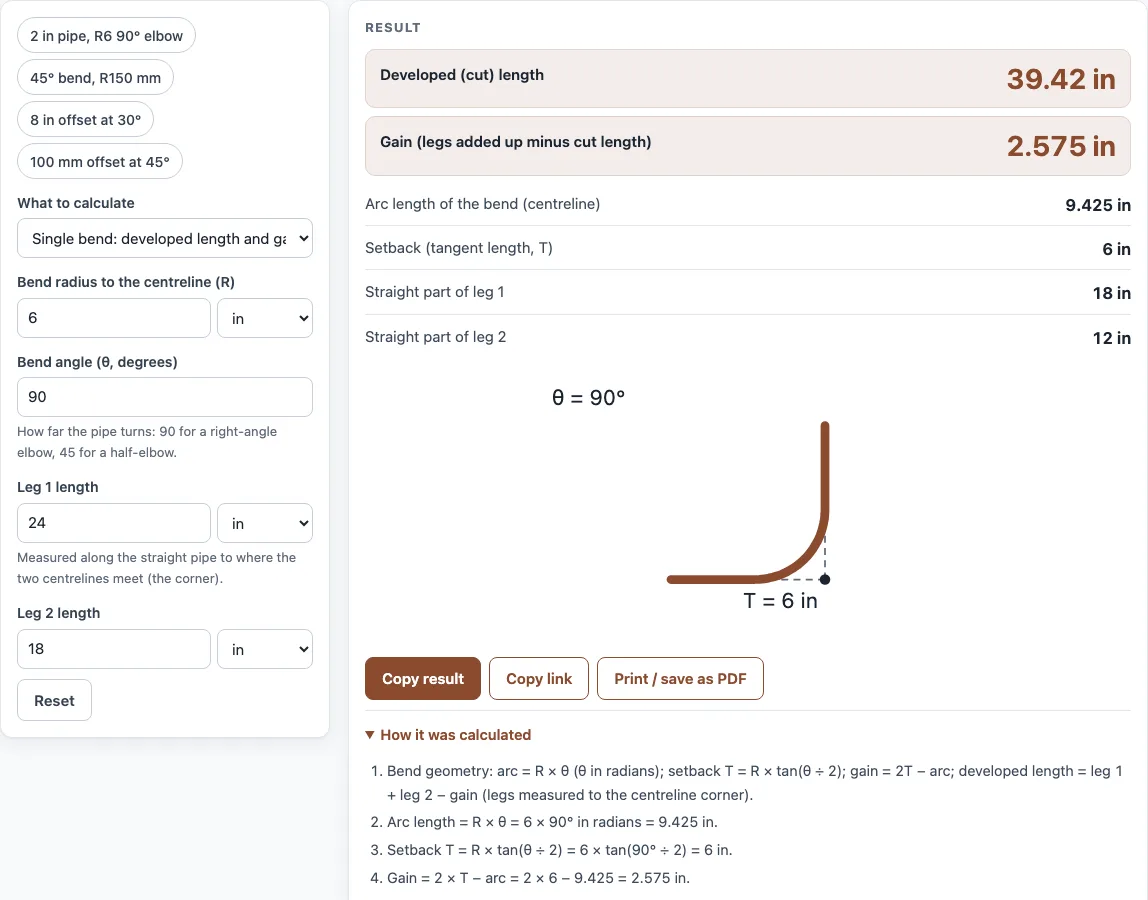
The developed length is the straight pipe you cut before bending. Along the centreline, the arc length is R × θ, where θ is in radians (degrees × π ÷ 180). The setback, or tangent length, is T = R tan(θ/2), and the gain is 2T − arc. When the legs run to the intersection of the centrelines, developed length = leg 1 + leg 2 − gain.
For a 90° bend with R = 6 in and legs of 24 and 18 in, the arc is 6 × 1.5708 = 9.425 in, T is 6 in, and the gain is 12 − 9.425 = 2.575 in. The developed length is 24 + 18 − 2.575 = 39.42 in.
What is gain in pipe bending?
Gain is the amount the cut length is shorter than the two legs added together. It is calculated as gain = 2T − arc. The bend follows the arc between the two tangent points, which is shorter than the path made by the two legs meeting at the corner.
The 90° example above has a gain of 2.575 in. A 45° bend with R = 150 mm and legs of 600 and 400 mm has a gain of 6.454 mm, so the developed length is 1000 − 6.454 = 993.5 mm.
How do you calculate an offset bend?
An offset uses two bends of the same angle θ to move the pipe sideways by a height H. The distance between the two bends is H ÷ sin θ, and the run (the horizontal distance covered) is H ÷ tan θ. The shrink is H(1/sin θ − 1/tan θ).
For an 8 in offset at 30°, the bends are 8 ÷ 0.5 = 16 in apart. The shrink is 8 × (2 − 1.732) = 2.144 in. The tool’s table lists the same calculation for 10°, 22.5°, 30°, 45° and 60°.
What is the offset multiplier for 30 and 45 degrees?
The offset multiplier is 1 ÷ sin θ. At 30°, sin 30° = 0.5, so the multiplier is 2.000. At 45°, sin 45° = 0.7071, so the multiplier is 1.414.
To find the distance between bends, multiply the offset height H by the multiplier. For a 100 mm offset at 45°, that gives 100 × 1.414 = 141.4 mm. The shrink multiplier is (1/sin θ − 1/tan θ), which is 0.268 at 30° and 0.414 at 45°.
What is shrink in an offset?
Shrink is the amount an offset reduces the overall length of pipe. It is calculated as H(1/sin θ − 1/tan θ). Because the offset path is longer than the straight run it covers, the pipe comes up short by this amount, so add the shrink when you mark a bend that sits beyond the offset.
For an 8 in offset at 30°, the shrink is 2.144 in. For a 100 mm offset at 45°, the shrink is 41.42 mm.
Sources
Checked October 2026:
- Bend geometry: arc length R θ, tangent R tan(θ/2), gain 2T − arc, offset travel H ÷ sin θ and shrink H (1/sin θ − 1/tan θ), from plane trigonometry
For estimation; verify critical designs against the applicable standard.
Worked examples
| Input | Result |
|---|---|
| 90° bend, R = 6 in, legs 24 and 18 in | developed length 39.42 in, gain 2.575 in |
| 45° bend, R = 150 mm, legs 600 and 400 mm | developed length 993.5 mm, gain 6.454 mm |
| offset H = 8 in at 30° | bends 16 in apart, shrink 2.144 in |
| offset H = 100 mm at 45° | bends 141.4 mm apart, shrink 41.42 mm |
| 90° bend, R = 9 in, legs 36 and 30 in | developed length 59.76 in, gain 3.863 in |
Calculated by the tool above with these values.
Frequently asked questions
Why does the tool show a warning?
The warning appears when a leg is shorter than the setback T. A leg that short leaves no straight pipe for the bend to start on, so the bend will not fit. Increase that leg or reduce the radius or angle.
What is the difference between centreline and outside corner legs?
Centreline legs run to the point where the pipe centrelines would meet. Outside and inside corner legs run to the edges of the pipe, so the tool uses the pipe outside diameter to convert between them. Choose the measurement method that matches how you take your measurements.
Where do I find the centreline radius for my bender?
Tube and pipe benders list the centreline radius for each die. It is the distance from the die’s centre to the centre of the pipe. Use that value, not the die’s outer radius.
Can I use the results on customer quotes?
Yes. Results may be used in commercial work, including quotes, calculations for customers, shop paperwork and reports, without attribution.
Does it work on a phone?
Yes. The calculator runs in your browser, so you can use it on a phone without installing anything.
Related tools
- Coil length calculator: use it to work out the length of material needed for a coil.
- Press brake tonnage calculator: use it to estimate the force a press brake needs for a bend.
- Hoop stress calculator: use it to check the stress in a pipe wall under internal pressure.
- Blank size calculator: use it to find the flat blank size before forming a part.
- All calculators: browse every calculator on the site.