Punching Force Calculator
Choose the hole shape, enter its size, the sheet thickness and the material's shear strength to get the punch force in kN and tons.
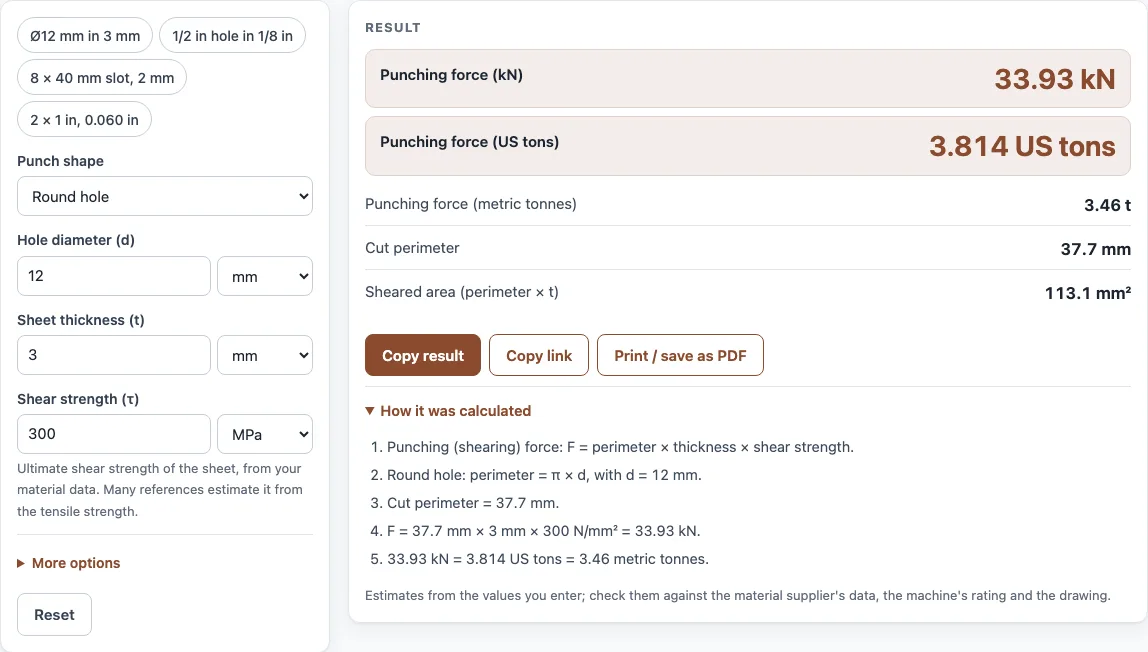
How to use the Punching force calculator
- Choose the punch shape: round hole, square, rectangle, oblong slot with rounded ends, or another shape.
- Enter the size fields for that shape. For a round hole, enter the diameter d. For a square, enter the side a. For a rectangle, enter sides a and b. For an oblong slot, enter the length L and width w. For any other shape, enter its cut perimeter directly.
- Enter the sheet thickness.
- Enter the shear strength from your material data. The default value is only an example, so replace it with your own value.
- Read the punching force in kN, US tons and metric tonnes. Results update as you type.
- Check the cut perimeter and sheared area. If the smallest punch dimension is less than the sheet thickness, a warning appears.
- Optional: open More options and enter a stripping force as a percent of the punching force.
- Open How it was calculated to see the formula and each step with your numbers.
Copy result copies the result lines with a link. Copy link copies the page address, which stores every input in the address, so opening it later restores the same calculation. Print / save as PDF prints the inputs, results, calculation steps and the date.
How do you calculate punching force?
Multiply the cut perimeter by the sheet thickness and by the shear strength. The formula is F = perimeter × sheet thickness × shear strength. For a 12 mm round hole, the perimeter is π × 12 mm, about 37.7 mm. With a 3 mm sheet and 300 MPa shear strength, that gives 37.7 × 3 × 300 = 33,930 N, or 33.9 kN.
The force depends on the length of the cut, not the area of the hole. A long slot needs more force than a round hole of the same area, because the punch shears a longer edge.
What is the punch tonnage formula?
Punch tonnage is the punching force expressed in tons. The tonnage uses the same formula, F = perimeter × sheet thickness × shear strength, and the result is then converted. Divide the force in kN by 8.896 to get US tons, or by 9.807 to get metric tonnes.
For the 33.9 kN example, that gives about 3.8 US tons.
What shear strength should I use?
Use the shear strength of your specific material, taken from your material data sheet or supplier. The tool has no material table, and the default value is only an example. Shear strength is usually lower than tensile strength for the same metal, but use the value from your data rather than a rule of thumb.
What is stripping force?
Stripping force is the force needed to strip the sheet off the punch as the punch withdraws. It is optional and is entered as a percent of the punching force under More options. It is shown as a separate result, so it does not change the punching force.
Can a punch be smaller than the sheet thickness?
You can enter a punch that is smaller than the sheet thickness, but the tool shows a warning when the smallest punch dimension is less than the sheet thickness. Small punches are likely to break under load. Check the tooling limits for your punch and die before you cut.
Sources
Checked October 2026:
- Shearing force = cut perimeter × thickness × shear strength (Kalpakjian and Schmid, Manufacturing Engineering and Technology); the shear strength comes from your material data
For estimation; verify critical designs against the applicable standard.
Worked examples
| Input | Result |
|---|---|
| Round hole 12 mm, t = 3 mm, τ = 300 MPa | 33.93 kN (3.814 US tons) |
| Round hole 0.5 in, t = 0.125 in, τ = 35 ksi | 30.57 kN (3.436 US tons) |
| Rectangle 2 in, t = 0.060 in, τ = 30 ksi | 48.04 kN (5.4 US tons) |
| Oblong slot (rounded ends) 40 mm, t = 2 mm, τ = 250 MPa | 44.57 kN (5.009 US tons) |
| Square 25 mm, t = 4 mm, τ = 200 MPa | 80 kN (8.992 US tons) |
Calculated by the tool above with these values.
Frequently asked questions
Can I use the punching force calculator for a slot?
Yes. Choose the oblong slot shape with rounded ends and enter the length L and width w. An 8 × 40 mm slot in 2 mm sheet at 250 MPa gives 44.6 kN.
What if my shape is not in the list?
Choose the option for another shape and enter its cut perimeter directly. The tool then uses that perimeter in the same formula.
What is the sheared area in the results?
The sheared area is the area of the cut edge. It equals the cut perimeter multiplied by the sheet thickness.
Can I use the results in a customer quote?
Yes. Results may be used in commercial work, such as quotes, calculations for customers, shop paperwork and reports, without attribution.
Is stripping force included in the punching force?
No. It is shown as a separate result when you enter a percentage under More options, so you can add it if your press must supply both.
Can I use inches and tons?
Yes. Enter the size and thickness in inches and the shear strength in psi or ksi; the result shows kN, US tons and metric tonnes.
Does the result include press efficiency?
No. Compare the force with your press’s rated capacity and leave a margin.
Related tools
- Press brake tonnage calculator: use it when you need the tonnage for bending rather than punching.
- Blank size calculator: use it to find the flat blank size before you punch or form a part.
- Coil length calculator: use it to work out how much coil length you need for a job.
- Stress calculator: use it to check the stress in a part under a given load.
- All calculators: use it to browse every calculator on the site.