Truss Calculator
Pick a truss type, span, height and panel loads to get the force in every member, tension or compression, drawn on the truss.
The truss calculator finds the force in every member of a pin-jointed truss, along with the support reactions, and marks each member as tension (T) or compression (C). It covers Pratt, Howe, Warren, king post, queen post and Fink trusses, so it can serve as a roof truss calculator, attic truss calculator, bridge truss calculator or simple truss calculator for checking a layout. It is a free online truss calculator that runs in your browser, with no sign-up, and it works on a phone. Results update as you type, so you can test different spans, heights and loads quickly.
Use it as a quick truss calc for roof, ceiling or bridge truss layouts before detailed design.
How to use the Truss calculator
Start by choosing the truss type: Pratt, Howe, Warren, king post, queen post or Fink (W truss). Then fill in the inputs in this order:
- Enter the span, which is the horizontal distance between the two supports.
- Enter the height, which is the depth of the truss at the centre.
- Enter the number of panels. For Pratt, Howe and Warren, use an even number from 2 to 12.
- Choose the loaded chord: top joints or bottom joints.
- Choose the load method: an equal load at each loaded joint, or a total load spread over the chord by tributary length. Enter the load value.
- Read the summary: left and right reactions, total load, number of members, and the largest tension and compression members.
- Check the member table, which lists each member’s length, force and T or C. The drawing shows tension and compression members in different colours with the forces labelled.
- Open “How it was calculated” to see the formula and each step worked with your numbers.
Keep the span, height and loads in consistent units, so the results are valid for your project.
Change one input at a time to see how it affects the forces. Copy link copies the page address, which stores every input, so opening the link later restores the same calculation. Copy result copies the result lines with a link. Print / save as PDF prints the inputs, results, calculation steps and the date.
How do you calculate truss member forces?
You find the support reactions first, then solve the joints one at a time until every member force is known. This works because a truss is in equilibrium: at each pin joint, the horizontal forces and the vertical forces must each sum to zero.
The tool assumes pin joints, so each member carries only an axial force, either pulling (tension) or pushing (compression) along its length. Loads act at the joints only, self-weight is ignored, and loads on the two support joints pass straight into the supports.
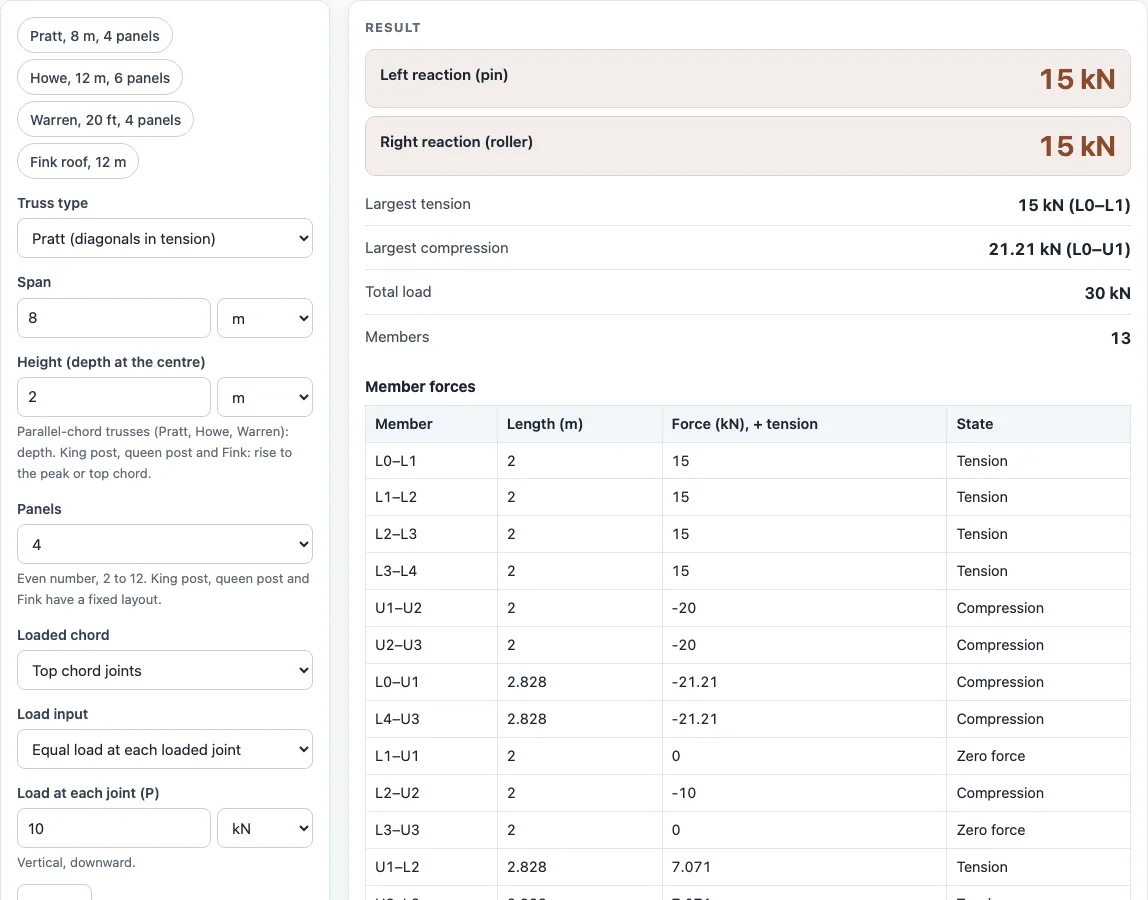
Take the Pratt example: 8 m span, 2 m high, 4 panels, and 10 kN on each of the three loaded top joints. The total load is 30 kN, so each support carries 15 kN. At the left end joint, the 15 kN upward reaction acts on the end diagonal L0–U1. That diagonal rises 2 m over a 2 m run, so it sits at 45°. Its force is 15 × √2 ≈ 21.21 kN in compression, which matches the maximum compression the tool reports. The horizontal part of that force, 15 kN, must be balanced by the bottom chord L0–L1, which is in tension at 15 kN.
What is the method of joints?
The method of joints is the solving technique that isolates each pin joint as a free body and applies ΣFx = 0 and ΣFy = 0 to it. A joint with only two unknown member forces can be solved directly, so you work from joint to joint in a sensible order.
Before solving, check that the truss is statically determinate. It is when the number of members + 3 equals 2 × the number of joints. The 3 comes from the support reactions: a pin gives two and a roller gives one. If the count does not match, the forces cannot be found by statics alone. The tool performs this check for you.
A member is in tension when it is pulled apart at its ends and in compression when it is pushed together. In the calculator, tension is shown as T and compression as C.
Sources
Checked October 2026:
- Method of joints for statically determinate pin-jointed trusses, m + 3 = 2j (Hibbeler, Engineering Mechanics: Statics)
For estimation; verify critical designs against the applicable standard.
Worked examples
| Input | Result |
|---|---|
| Pratt (diagonals in tension), span 8 m, height 2 m, 10 kN per joint | reactions 15 / 15 kN; max tension 15 kN (L0–L1); max compression 21.21 kN (L0–U1) |
| Howe (diagonals in compression), span 8 m, height 2 m, 10 kN per joint | reactions 15 / 15 kN; max tension 20 kN (L1–L2); max compression 21.21 kN (L0–U1) |
| Warren (no verticals), span 8 m, height 2 m, 10 kN per joint | reactions 25 / 25 kN; max tension 17.5 kN (L1–L2); max compression 20 kN (U2–U3) |
| King post, span 16 ft, height 4 ft, 8 kip total | reactions 4 / 4 kip; max tension 8 kip (L0–L1); max compression 8.944 kip (L0–U1) |
| Fink (W truss), span 12 m, height 3 m, 30 kN total | reactions 15 / 15 kN; max tension 30 kN (L0–L1); max compression 33.54 kN (L0–U1) |
Calculated by the tool above with these values.
Frequently asked questions
Can I use this as a roof truss calculator?
Yes, for a first check of member forces in a roof truss. Roof trusses for buildings are designed to the local building code by a truss manufacturer or engineer, so treat the results as preliminary sizing only.
What is the difference between a Pratt and a Howe truss?
The difference is the direction of the diagonals. In a Pratt truss the diagonals are in tension, and in a Howe truss they are in compression. For the 8 m, 2 m, 4-panel example with 10 kN per top joint, the Pratt has a largest tension of 15 kN and the Howe has 20 kN. Both reach 21.21 kN in compression at the end diagonal.
Which members of a truss are in tension?
It depends on the truss type. In a Pratt, the diagonals are in tension, while in a Howe they are in compression. In a simply supported truss loaded from above, the bottom chord is usually in tension and the top chord is in compression. The drawing colours tension and compression members differently, so you can check each member in your layout.
Can I use the results for commercial work?
Yes. Results may be used in commercial work, such as quotes, calculations for customers, shop paperwork and reports, without attribution. Print / save as PDF gives you a record of the inputs, results and steps with the date.
Is my data uploaded anywhere?
No. Everything runs in your browser, and nothing is uploaded. Copy link puts your inputs into the page address, so anyone with that link can open the same calculation.
Related tools
- Beam load calculator: use it when a single beam, rather than a truss, carries the load.
- Column buckling calculator: use it to check whether a compression member could buckle before reaching its strength limit.
- Shear moment diagram calculator: use it to see how shear and bending change along a beam.
- Stress calculator: use it to turn a member force into stress by dividing by the cross-sectional area.
- Factor of safety calculator: use it to compare a member’s strength with the force it carries.
- All calculators: use it to browse the full set of tools on this site.